
Hey guys! I've been coding like crazy the past couple of days trying to sort out the pacing and mid-game bottlenecks. The economy was completely out of whack, and players had no good way of seeing why their factories were stalling. This update addresses both with new analytics tools, depleting resource deposits, and a major economic rebalance.
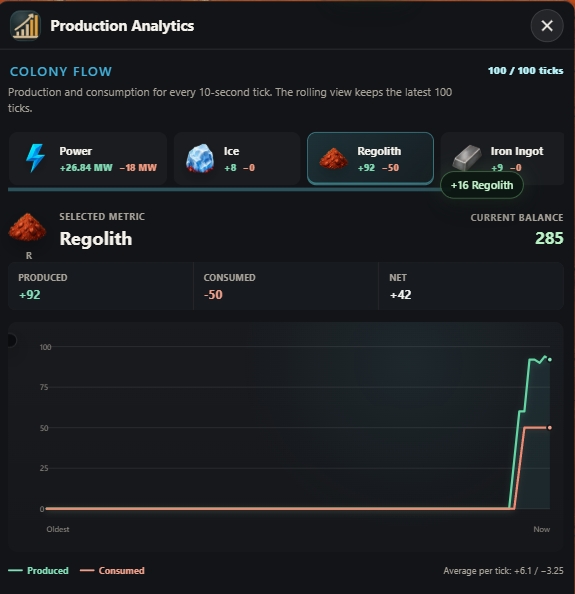
Production Charts
There's a new toggle button at the top of the info drawer. Clicking it opens a live graph of production and consumption over time. It helps a ton in finding exactly where your production chain is backed up or starving, making colony optimization much more satisfying.
Finite Deposits and Manual Tapping
Rich resource nodes (Ice, Carbon, Metal Ore) are no longer infinite. They will eventually deplete, which means you have to keep surveying and expanding your colony's reach. I also added manual tapping, so you can click or tap directly on deposits to gather raw resources in a hurry.
New Dust Storm Rules (Lvl 11+)
Dust storms are now far more hazardous for heavy industry. You can no longer build factories, power plants, or storage units outside of protected zones. Only extractors and outposts can be built out in the open (still at 5x cost and exposed to the hourly storms). Protect your heavy industries!
Massive Economy Overhaul
Higher tier items actually sell for real money now instead of pocket change (e.g., Robotics went from 40 to 790 Gold). To match this, building costs have been scaled up, and the final goal (Atmospheric Processor) now costs 100k Gold. Upgrades like construction speed have also been heavily buffed to feel worth it.
Offline Progress Tune-up
I added new upgrades to extend offline time limits and full-speed progress minutes. The away screen now has a much cleaner breakdown showing ticks, gathered resources, and storm losses.
Other Tweaks & Fixes
- Building Pausing: You can now pause/resume individual buildings, which displays a small pause icon on the map.
- Ancient Relics: Relics now count as matching buildings for adjacency bonuses (a huge help for specialized setups!).
- Debugging Overlay: Added a tiny FPS/Zoom overlay on screen for debugging and performance tracking.
Let me know what you think of the new pacing!